Contents
In the annual M2 model, the IT budget forecast combines closed-month actuals, open commitments due by year-end and future uncommitted costs. I designed it so that each part can be traced from a document or assumption to the report for the board.

Knowing that half the budget has been used opens the conversation. Combining that figure with signed contracts, billing dates and remaining work helps answer how much we still expect to spend. That is the focus of M2.
Download M2
The complete package is free, with no form to complete. It includes a blank template and worked example in Polish and English, guides and a local tool for CSV import, company branding and migration exports.
Start with the example. It shows how actuals, commitments and forecast relate to each other using data from a hypothetical company. Use the blank template for your own budget.
M2 package v1.0 · updated: 1 November 2026
Download M2 packageThe complete package includes both languages, guides, CSV importer, logo replacement and migration export.
Spending is part of the picture
A cost already recorded in the documents is known. A contract for the next project stage may not yet appear in actuals. There may also be work that we have not ordered but still expect to fund this year.
Looking only at invoices can overstate the amount still available. Adding the full contract value to invoices that settle the same contract would overstate the forecast instead.
That is why M2 retains the approved budget separately. Actuals and the expected year outturn are updated alongside it. A revised forecast does not overwrite the reference against which the budget was agreed.
Three parts of the forecast
Actuals include documents from the selected year and closed months. Credit notes that reduce cost carry a negative sign.
Open commitments are contract-stage amounts plus approved changes, less linked actuals. Each stage has its own identifier, so an invoice settles the appropriate part of the commitment.
Future uncommitted costs are entered separately. They cover expected spending outside open commitments. That boundary matters: entering a contract amount again would double count it. The model helps check the links, but cannot recognise on its own that two differently described entries refer to the same work.
A required blank is distinguished from an explicit zero. When forecast inputs are incomplete or data errors are detected, the report withholds the year outturn.
What remains to be spent?
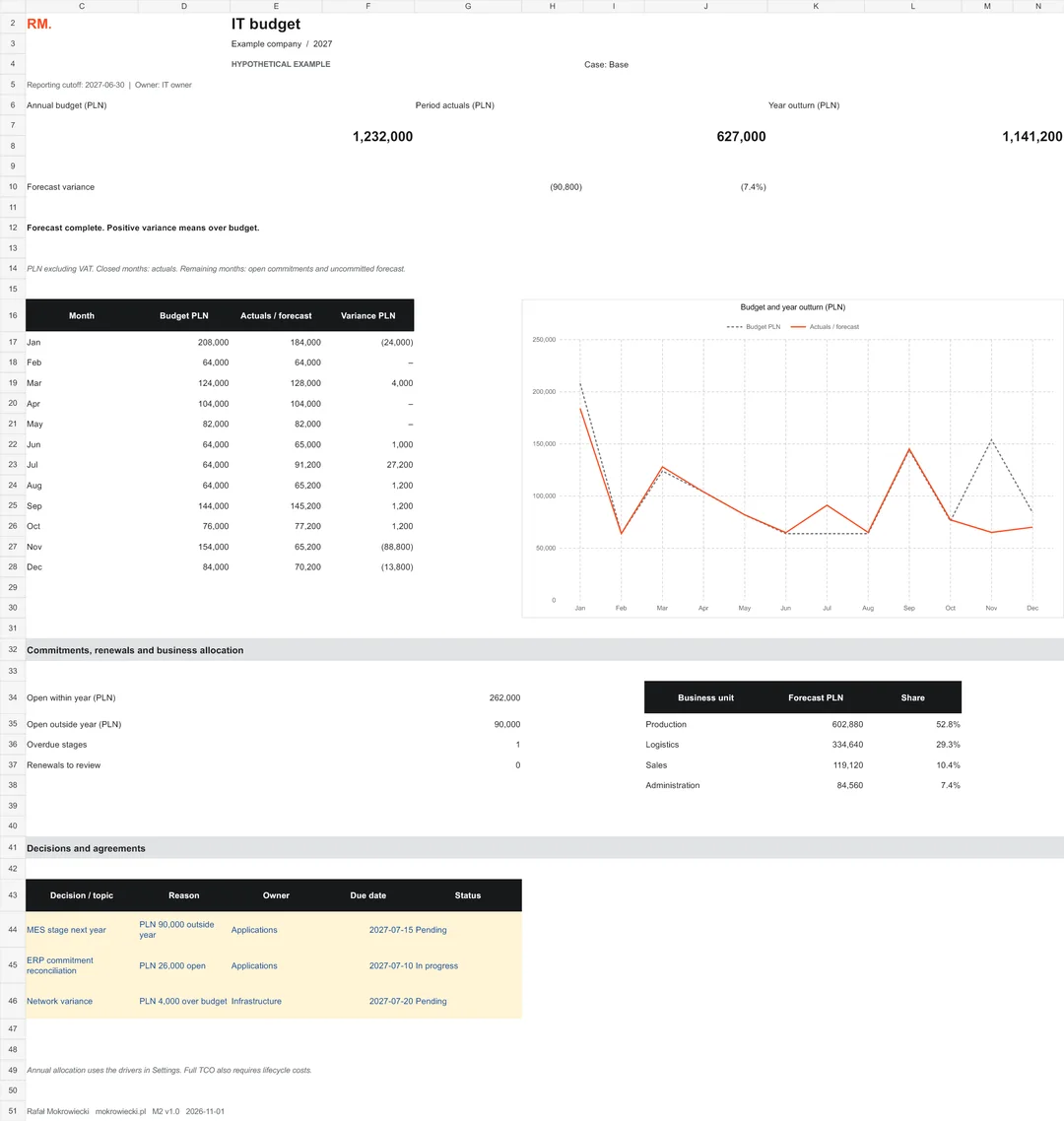
In the hypothetical example, the annual budget is PLN 1,232,000, with January–June actuals of PLN 627,000. Open commitments due within the year add PLN 262,000. Future uncommitted costs are PLN 252,200.
The base-case year outturn is PLN 1,141,200, or PLN 90,800 below budget. I do not automatically describe that difference as a saving. In the example, a PLN 90,000 MES project stage is dated in the following year. Part of the variance therefore needs to be explained through timing before it is attributed to better budget management.
You can change the case below. As in the workbook, it affects only future uncommitted costs. Actuals and commitments remain unchanged. In this example, the future uncommitted costs belong to Run; the adjustments shown are illustrative assumptions.
Hypothetical example
- Actuals
- 627,000
- Open commitments in year
- 262,000
- Future uncommitted
- 252,200
Variance against budget: −90,800 PLN
Base with no adjustment to future uncommitted costs.
PLN excluding VAT. Example from M2, not client results or a benchmark. Annual budget: PLN 1,232,000.
From ERP export to decisions
I do not want an IT director retyping invoices every month. The package therefore includes a local importer for a complete CSV export. Column names and source keys can be configured to match the export used by the organisation.
The importer checks identifiers, dates, amounts and item mappings. It saves a new workbook and compares formulas before and after the change. This is file-based import, rather than a direct connection to SAP, Dynamics or another ERP.
Each import replaces the previous batch. Use a complete export covering the earlier months and corrections needed for the report. Reconcile the row count and total to the source. Technical checks alone do not establish that every document was included in the export.
The report ends with space for decisions, reasons, owners and due dates. For me, this is an essential part of budget control: once a variance has been identified, it should be clear who will act on it and what they will do.
View the example report
Making costs visible to the business
Shared infrastructure, security services and team effort cannot always be assigned directly to one department. M2 can allocate the annual outturn using explicit drivers, such as user numbers, resource consumption or effort.
Each driver has a unit, source and data period. Agree its suitability with process owners. Being easy to calculate does not establish that it accurately represents service consumption.
This is annual IT budget cost allocation. Full total cost of ownership, or TCO, requires a lifecycle horizon and costs including implementation, operation, changes and retirement. M2 does not calculate that result. Changing the annual driver reallocates the entire year outturn, including its historical component.
Adapt the model to your company
Company name, year, report owner and business-unit names are central settings. The supplied tool replaces the logo and report accent colour. Enter cost categories, ERP mappings and allocation drivers in the designated input areas without editing formulas.
Formulas are protected against accidental changes, while input cells remain unlocked. Worksheet protection is neither encryption nor an access-rights system. The file still needs appropriate storage and an agreed owner.
When requirements grow
I do not set a budget value above which Excel becomes unsuitable. Process requirements matter more: concurrent editing, multiple approval stages, granular access rights and change history.
M2 assumes one owner consolidating the report. Version 1.0 has prepared ranges for 30 budget items, 1,000 ERP rows, 100 commitment stages, 12 allocation drivers and 4 business units. These are this model's capacities, not Excel's technical limits. Do not add data outside the prepared areas.
The package exports flat tables, assumptions and drivers, together with the calculation rules. This supports migration to another solution while preserving identifiers and reconciliations.
Where to start
Open the example and trace one item through its budget, actuals document, open contract balance and effect on the forecast. Then prepare your own template using the basis agreed with finance. Start each new year with a new annual file, carrying forward only unsettled stage balances.
M2 uses PLN excluding VAT, a calendar year and a management purchasing basis by document month. Capital purchases are recognised at purchase value; the model does not calculate depreciation, accruals, prepayments or bank cash flows. Agree the basis for internal costs within your organisation.
The importer was tested on Windows with desktop Excel 16 and PowerShell 7.6.5. The guide also explains the workflow without the script. Package version 1.0 was prepared on 1 November 2026. All example data are hypothetical; they are neither client results nor an IT cost benchmark.
Article updated: .